



Metaplay SDK Release 36 is here, and it's built around one idea: reducing the surface area for mistakes. We've collapsed session management into a single readable flow, made game configs immutable by default, and given the CLI the ability to handle more of the routine work your engineers shouldn't have to think about.
Metaplay SDK Release 36 highlights
Simpler session management
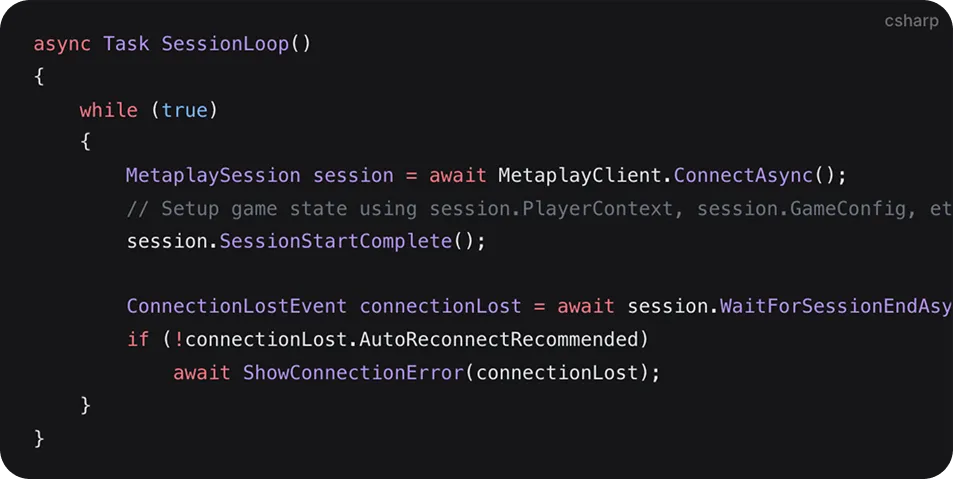
Managing how your game connects and reconnects to the server used to require coordinating logic across multiple callbacks scattered throughout your codebase. New engineers had to trace through several different lifecycle methods just to understand the flow, and every handoff point was a place where bugs could creep in.
R36 replaces all of that with a single async method. The entire connection-to-gameplay-to-disconnect loop becomes a straightforward linear sequence using the new MetaplayClient.ConnectAsync() and MetaplaySession APIs. Your engineers write less code, new team members get up to speed faster, and there are fewer places for things to go wrong.
The old callback-based approach still works if you need it, but we expect most teams will want to migrate — it's a genuine quality-of-life improvement.
Read more in the Connection Management guide →
Immutable game configs
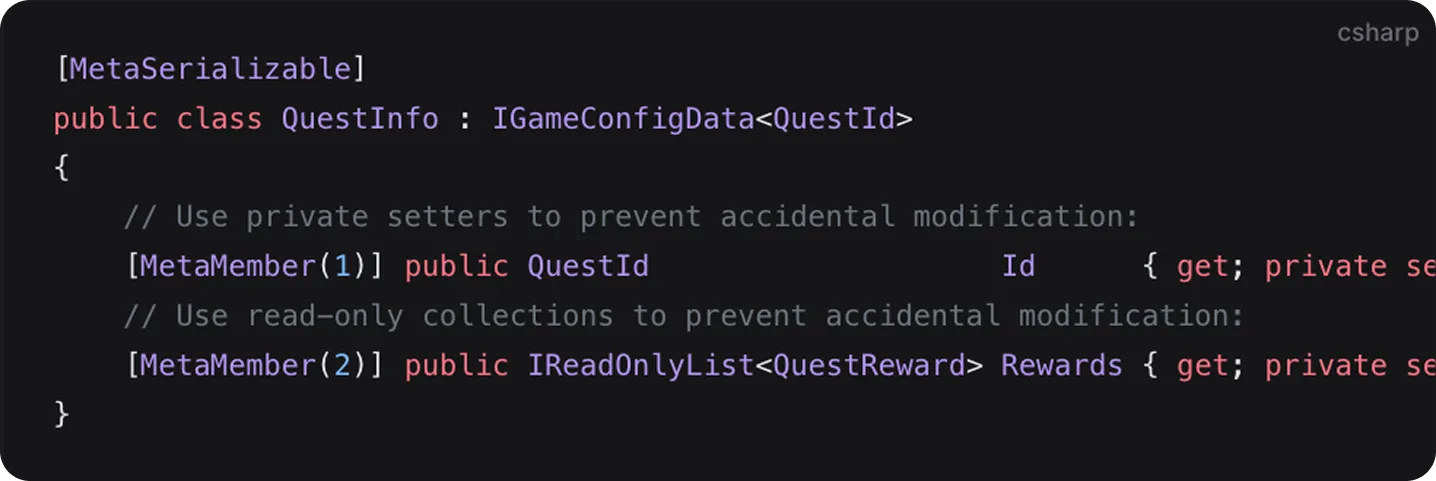
Game configs define how your live game behaves — item stats, event schedules, economy tuning, everything your product team tweaks on a regular basis. Accidentally mutating config data at the wrong time can cause hard-to-find issues that only surface in production, usually at the worst possible moment.
R36 introduces read-only game configs. By using IReadOnlyList in your config data classes, you can make your entire config structure immutable. Unintended changes are caught automatically at compile time, long before they reach players.
This is the kind of safety net that pays for itself the first time it catches a bug your team would have spent hours debugging. Fewer surprises in production, more confidence in every update you ship.
Learn about read-only game configs →
A CLI that does more of the heavy lifting
The Metaplay CLI now handles more routine tasks for you. SDK updates via metaplay update sdk preserve your team's customizations automatically. Secret management is simpler with metaplay secrets update and --overwrite support. And environment aliases let you create shortcuts for the environments your team works with most.
The result is less manual work and fewer opportunities for human error in your day-to-day operations. If you're using Claude Code or another AI coding tool, you can also fetch migration guides directly in your terminal with the Metaplay MCP server — no context switching required.
Faster config navigation in the dashboard

Game configs can be deeply nested, and navigating them used to mean clicking through many levels one at a time. Now a single click expands or collapses an entire section. It also works when comparing config versions or reviewing experiment changes — a small change that adds up to a big time saving for anyone who spends time in the LiveOps Dashboard.
What else is new in Metaplay R36?
.NET 10 support
Latest runtime performance and security improvements. .NET 9 is still supported this release but will be dropped in R37.
50x faster bulk database operations
MultiInsertOrIgnoreAsync() and MultiInsertOrUpdateAsync() now use multi-row VALUES syntax, making them up to 50x faster for small items. If your game runs regular backend maintenance tasks, you'll notice the difference.
Better monitoring and observability
MySQL connection pool metrics are now exposed as Prometheus metrics, giving your ops team earlier warning of potential database issues. Dashboard page titles also now show in your browser tabs, so you can tell environments apart at a glance.
AI assistants that understand your game backend
We're making AI coding tools more useful for Metaplay development. The Metaplay Docs MCP Server gives tools like Claude, Cursor, and Copilot direct access to our docs, SDK source code, and sample projects — far more context than generic web searches can provide. There's also a custom Metaplay ChatGPT for quick doc lookups.
Learn more about Metaplay AI Assistants →
For the full list of changes, check out the R36 release notes.
Start making games with Metaplay
Already using Metaplay? Update to R36 via metaplay update sdk or download the latest SDK from the portal.
New to Metaplay? Book a demo and we'll walk you through what R36 can do for your team. You can also download the SDK for free and try it yourself, or jump into the docs to explore the platform. If you have questions, come find us on Discord.
FAQ
What is the main change to session management in Metaplay R36?
R36 replaces the old multi-callback lifecycle model with a single async method, MetaplayClient.ConnectAsync(). The entire connect-to-gameplay-to-disconnect sequence becomes a linear async flow, which means less code to write, fewer places for bugs to hide, and a much shorter onboarding curve for engineers new to the codebase. The callback-based approach still works for teams that need it.
What are immutable game configs in Metaplay R36 and why do they matter?
R36 lets you mark config data classes as read-only using IReadOnlyList, making the entire config structure immutable. Any accidental mutation is caught at compile time before it can reach production. Game configs control item stats, economy tuning, and event schedules – the kind of data where a silent mutation can cause hard-to-debug issues that only surface under live conditions.
How much faster are bulk database operations in R36?
MultiInsertOrIgnoreAsync() and MultiInsertOrUpdateAsync() are up to 50x faster in R36 for small items, using multi-row VALUES syntax instead of individual inserts. Games that run regular backend maintenance tasks – bulk state updates, batch player operations – will see a meaningful reduction in execution time.
How does the Metaplay CLI in R36 handle SDK updates without overwriting customisations?
Running metaplay update sdk in R36 applies the new SDK version while preserving your team's customisations automatically. Previous update workflows required manual reconciliation of custom changes after each SDK upgrade. The new command handles the merge, reducing the operational overhead of staying current with SDK releases.

![Announcing Metaplay Starter [Updated for 2026]](/images/blog/announcing-metaplay-starter-featured.webp)