

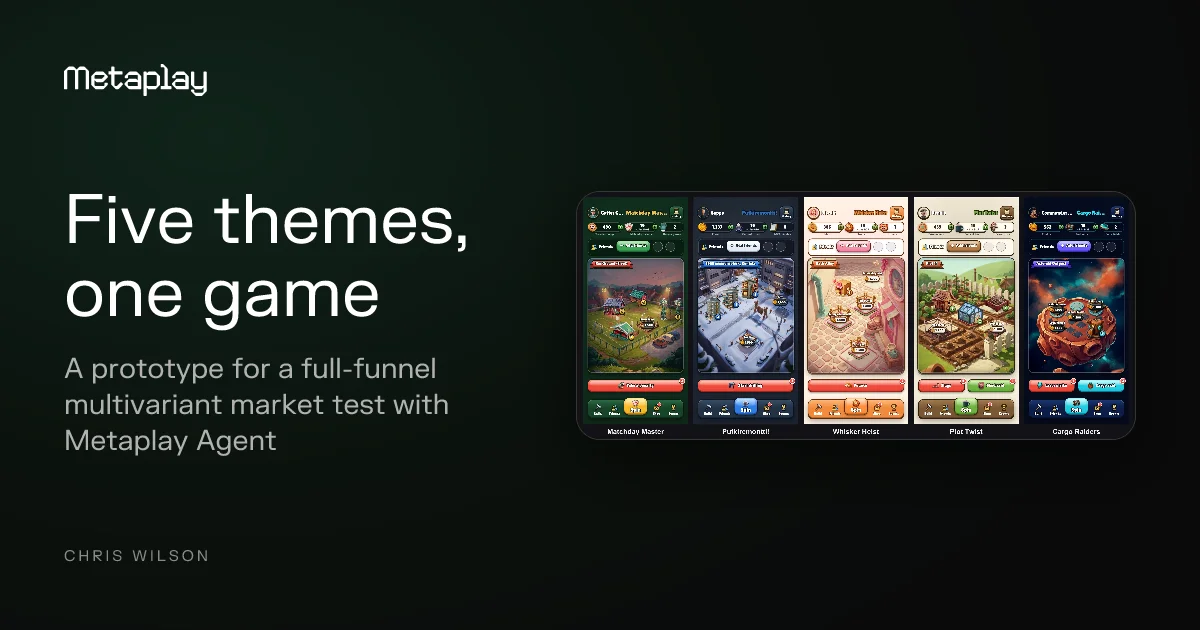

The old way of market testing new games used to stop at the storefront. Now, you can carry that test into the game with Metaplay Agent and Metaplay's game configs.
Back in 2019, somewhere around the start of Covid, a bunch of smart developers at the game studio I used to work at, Futureplay, sat down to work out how we should go about launching a new game.
We already had the core mechanic, and it was good. Our lead product analyst was a big fan of Merge Dragons, and he always had an eye on what was performing well in the top-grossing charts. This was before Royal Match, when Candy Crush, Homescapes, Gardenscapes and just about all of the other Scapes dominated. He fused the two together into the base of a new game: a soothing merge camp alongside a slightly more complex match-3. It played perfectly, and we knew it was going to be a hit. The problem was that it didn't have a theme.
So we set about fixing that, and not in any old way. We wanted the theme to give this game the best chance in the market. That meant designing a full-funnel theme test, from ad impression to store install, with several different themes laid over the same core mechanic. For each theme we produced one UA creative, one app store icon, five app store screenshots and one game trailer, all showing the same mechanics of the same game with a different skin on top. Bakery, underwater, space, birds, candy – you name it, we had a theme for it. We threw them all at the wall to see what stuck, and garden came out on top: it had the lowest CPI and the highest install rate. And so the game launched with a garden theme.
Seven years later, after the release of the Metaplay Agent, I wanted to see whether I could take that experiment one step further. We've spent a lot of time talking about how Metaplay is the best and fastest way to make durable C# multiplayer live-service games, games that last much longer than the throwaway prototypes popping up everywhere right now. But I wanted to ask a different question: could Metaplay also serve the prototyping and validation use case? Could we run a full-funnel test the way we did for that launch, but instead of stopping at the store page, carry on into the game and measure the core in-game KPIs too?
I was fairly sure Metaplay's game configs and its built-in segmentation would let one server and one game project serve five different themes.
I also had the right excuse to try. At Metaplay we've been running an internal game jam to test the Metaplay Agent and to build up a bank of sample projects. Each of us takes a week to make a new game on Metaplay, from the pitch to a playable build. The prototypes so far range from Table Stakes, a four-player real-time card game, to Sticky Paws, a PvP collectible card game, and each one ends up as a sample anyone can play, read and clone. We've made more projects than we've written about so far, and those posts are coming soon.
Then it was my turn to pitch a game for the jam, and I couldn't help seeing whether I could stretch the full-funnel marketing test further. So I pitched one game in five themes, to be built with the Metaplay Agent and sold with some AI-generated ad videos. This was the pitch:
Extending a theme test from the ad into the game
For the aforementioned launch at the previous game studio, the test tracked metrics on the marketing layer only – CPM, CPI and an install rate from a fake storefront install page. This time the idea was to carry it right through into the game, so that for each theme we could track day 1, day 3 and day 7 retention, sessions and even basic monetisation. We haven't run the ads yet, as that's the next step, but we do now have the basis for running this kind of experiment, and you can use it too.
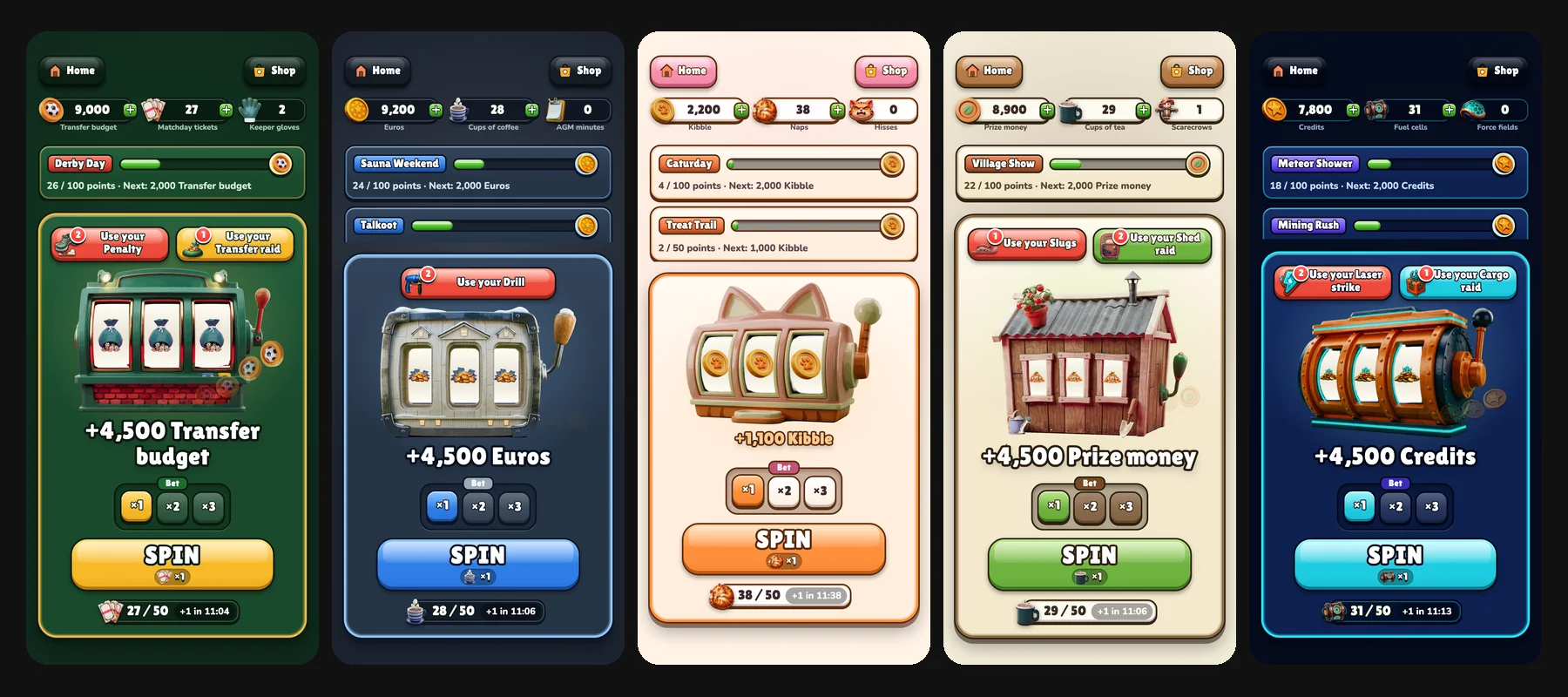
The mechanic is Coin Master-style, a top-grossing template that fits Metaplay well. You need server-side validation for the spins and the economy, async multiplayer for raiding other players, a solid live-service setup for running constant LiveOps, and battle-tested infrastructure for when the winning variant scales to the top of the charts. You spin a slot machine to win coins, spend the coins building your base, and attack or raid other players' bases while they're offline.
The themes were an allotment, football, cats, space and putkiremontti, the pipe renovation every Finn has to live through at least once or twice:
| Theme | Game title | You are |
|---|---|---|
| Allotment | Plot Twist | A British allotment holder, growing a prize plot |
| Football | Matchday Master | The chair of a lower-league club, rebuilding its ground |
| Cats | Whisker Heist | A street cat, building a cat café |
| Space | Cargo Raiders | The captain of a mining colony |
| Putkiremontti | Putkiremontti! | The chair of a Finnish housing company, through a pipe renovation |
For each theme there's a video ad and the game itself. Each ad links to its own theme, and the link tells the game server which theme and which ad a new player came from. That way we can follow one player from an ad into a different game, all inside the same Metaplay project. As with that launch, we'd find the best-performing ad, but this time we could put the best-performing game next to it, because Metaplay records the retention and monetisation data we're after on every player, tagged with their theme.
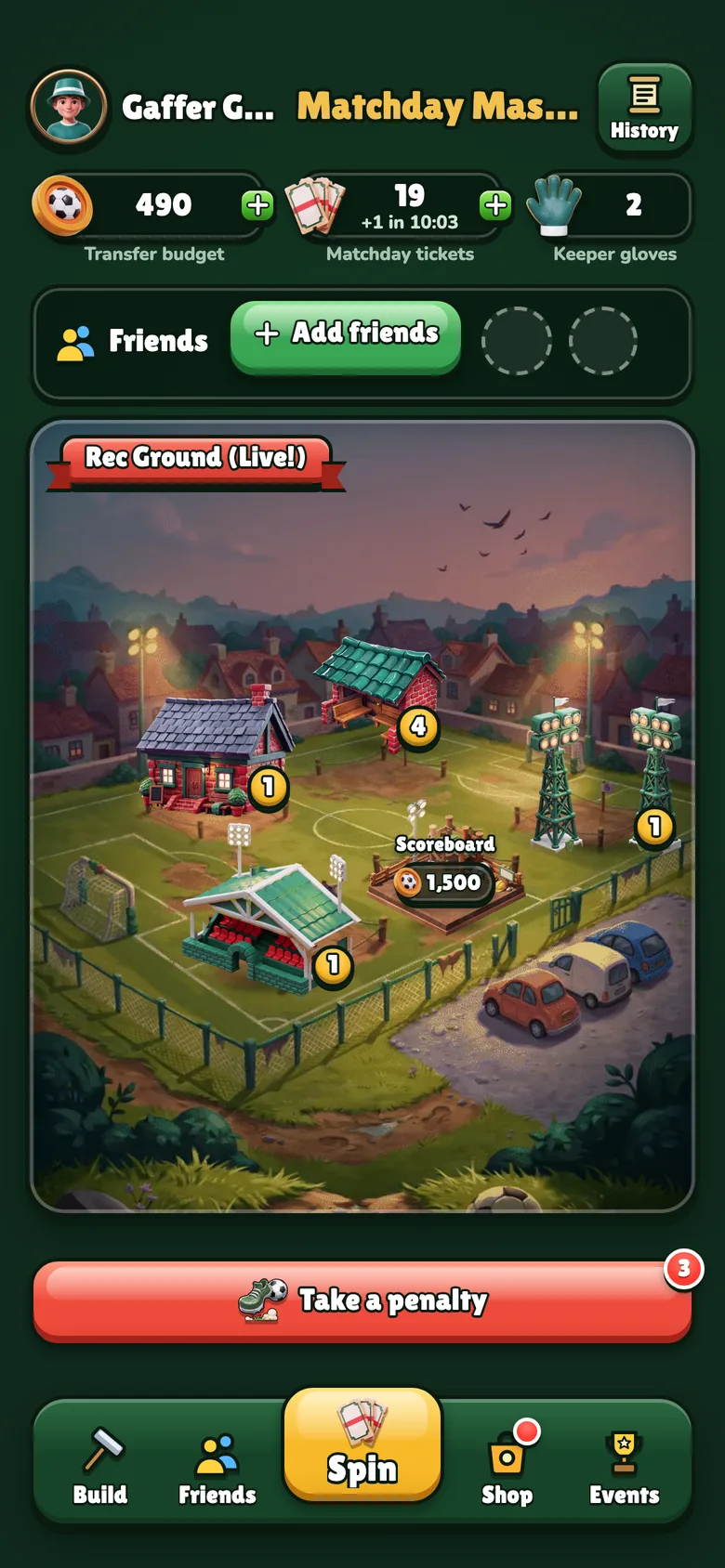
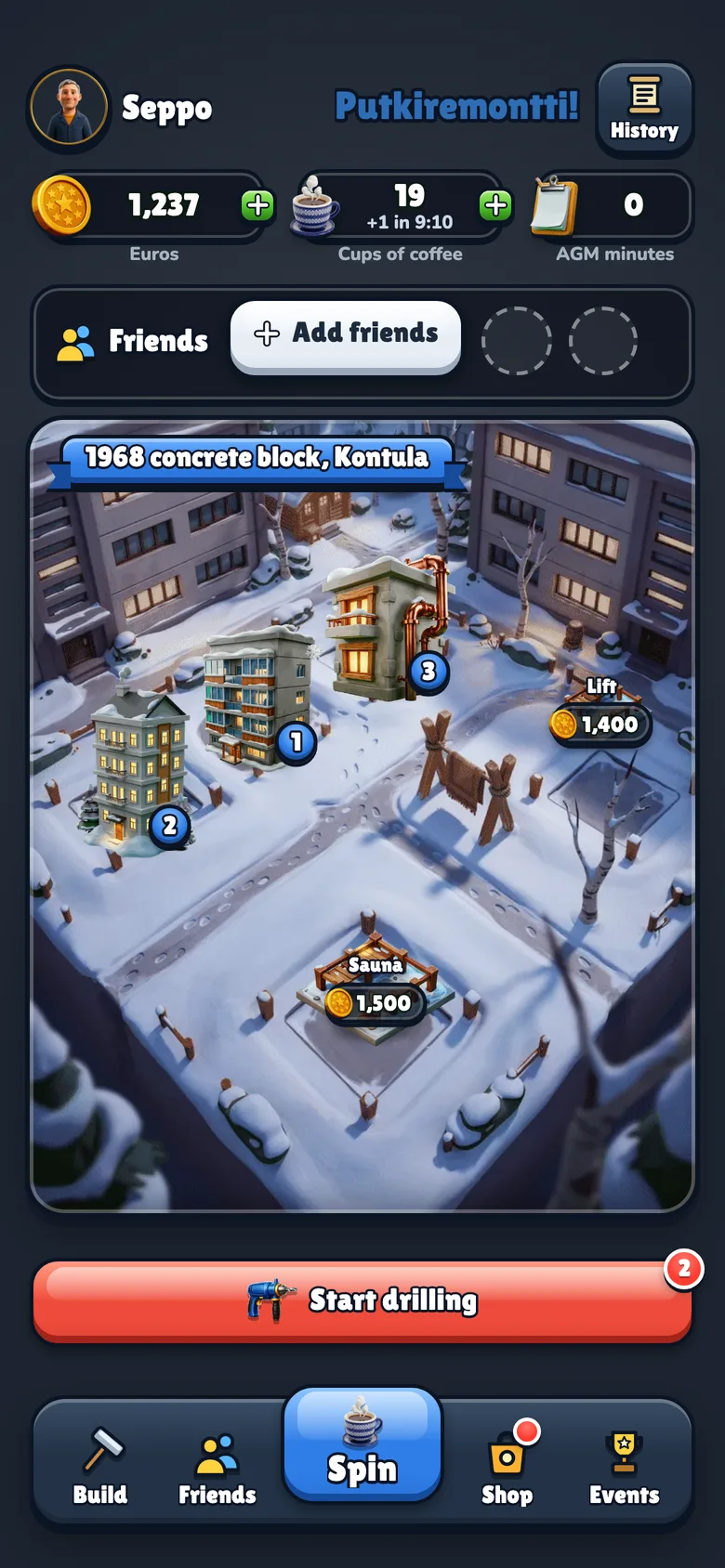
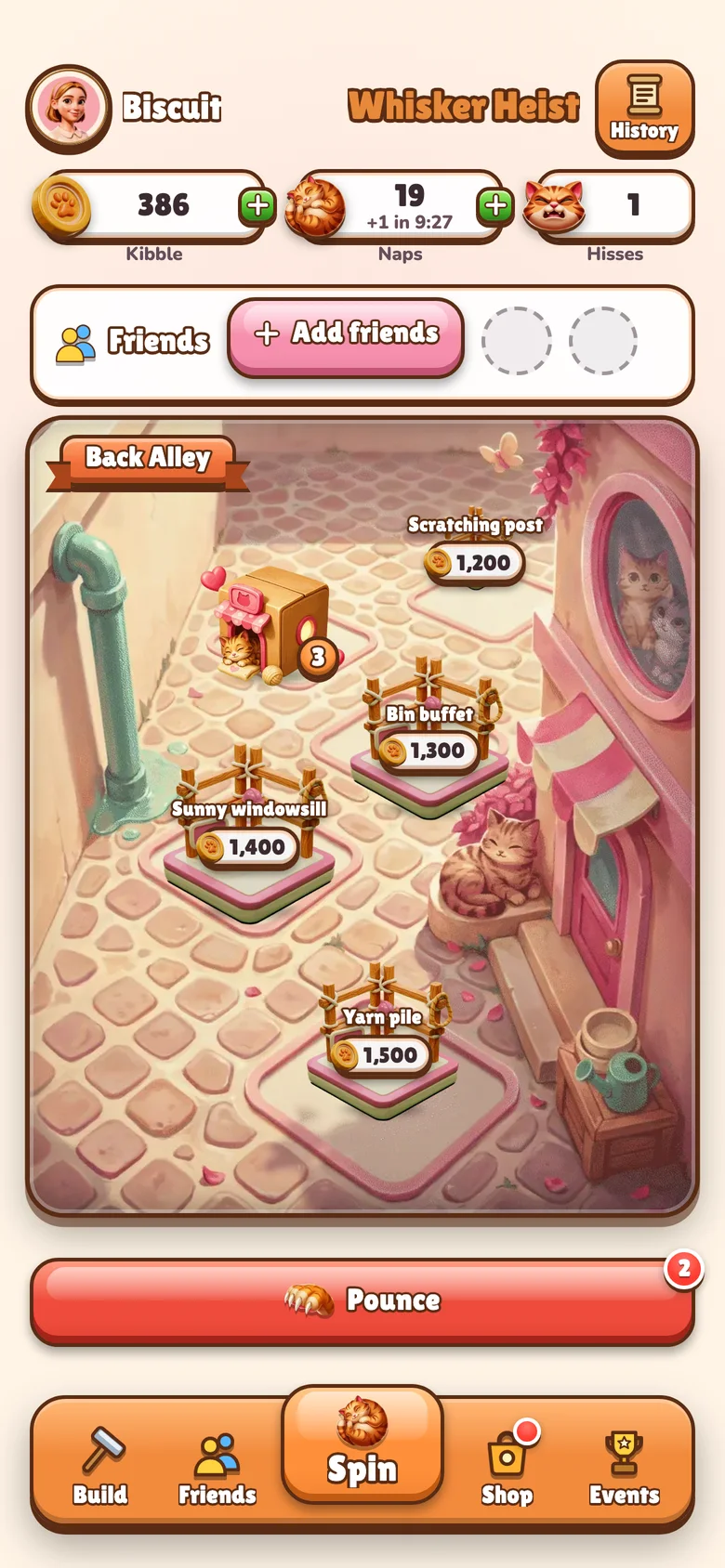
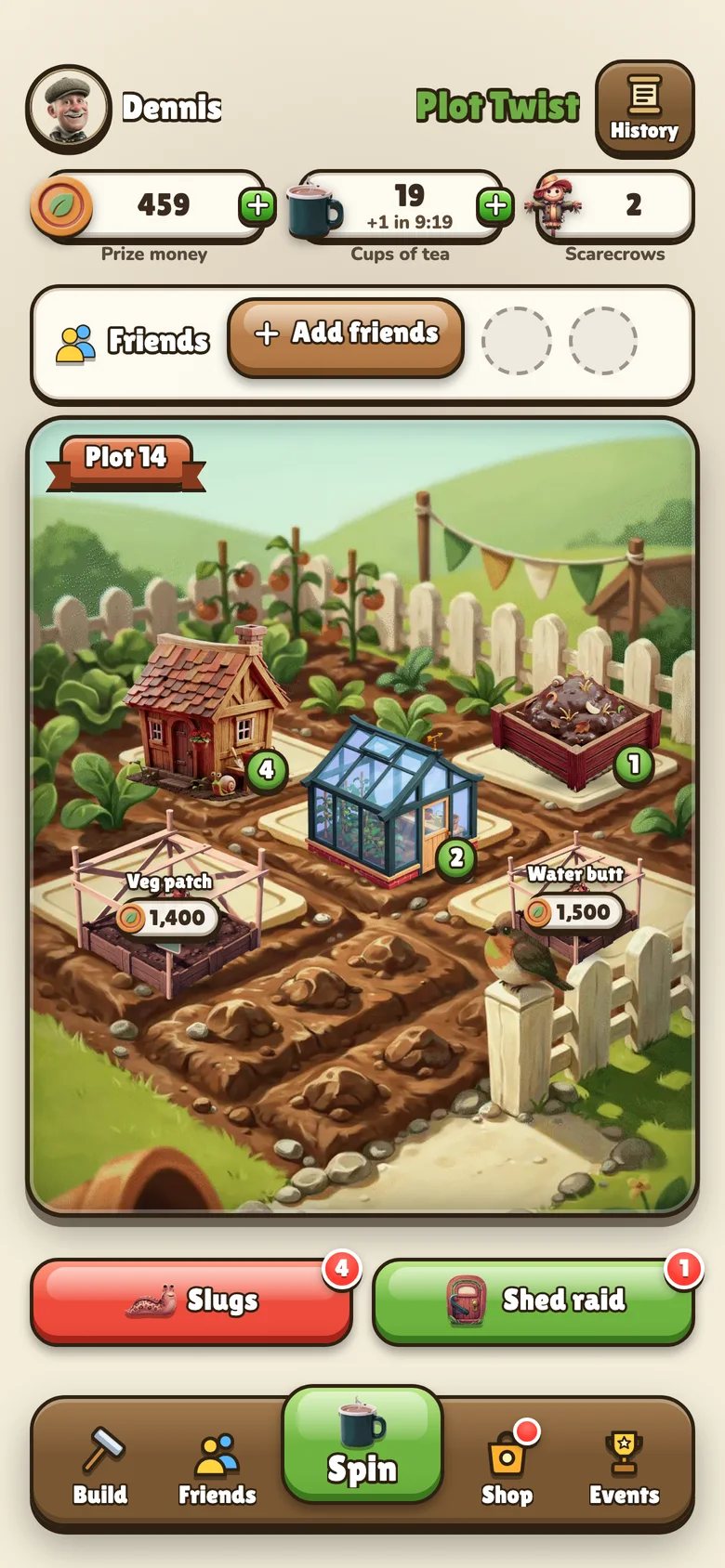
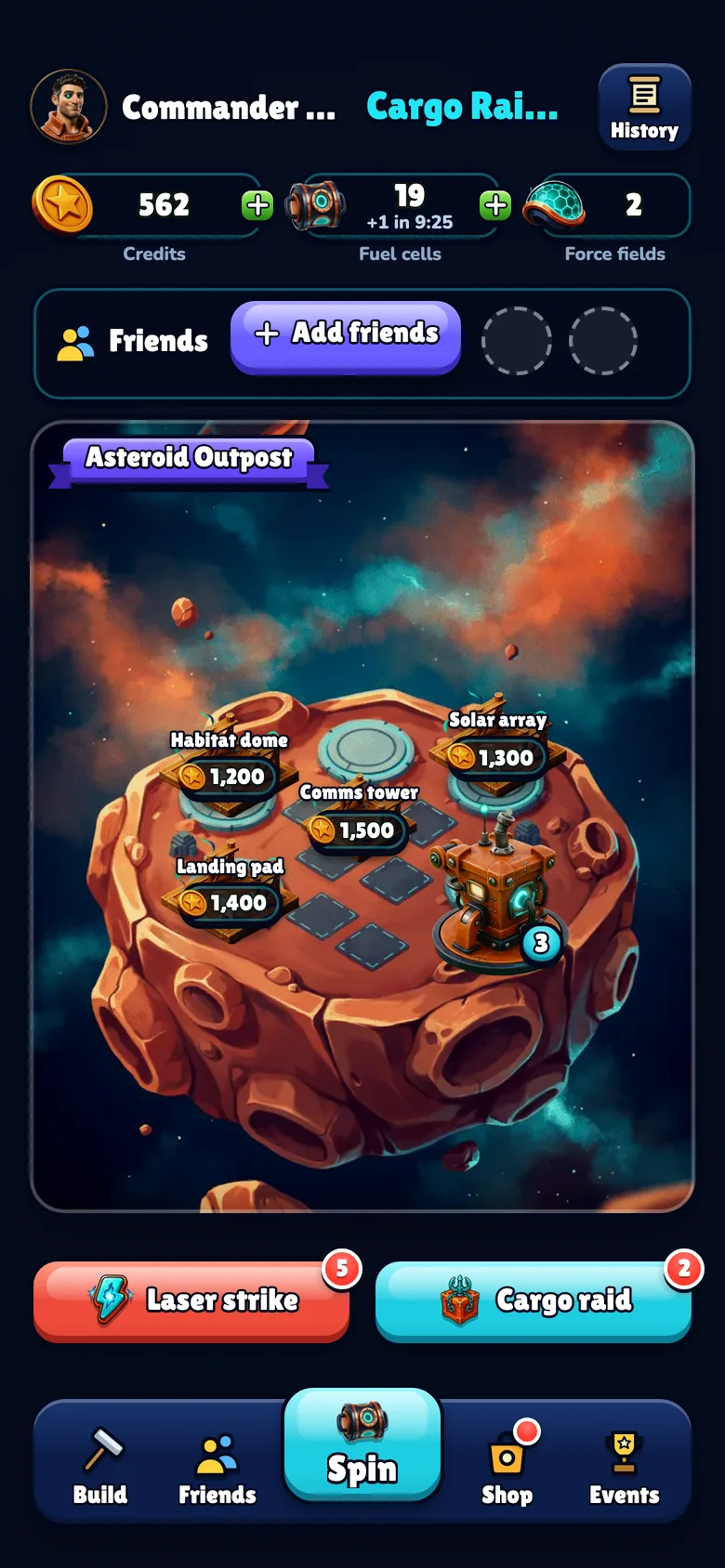
The rules, the numbers and the progression are identical in all five games. Only the words, the art and the colours change between them. In Matchday Master the coins are a transfer budget and a spin is a matchday ticket. In Putkiremontti! the coins are euros, a spin is a cup of coffee and a raid is a cellar raid.
The process, the prompting and the game
I planned the game on a Friday afternoon in late September. Before writing a line of game code, I had a market check of the raid-and-build genre, the decision to ship five themes in one game, and scripts for one ad per theme. I generated the ads that evening.
On Saturday morning I worked with Claude on the game design document, the specs for the game configs, the server and the web client, and a build plan split into nine prompts. Then I let Claude Code run them unattended. It started from the skeleton of our Table Stakes sample with the card game taken out, and over the next 26 hours it built the slot machine and the wallet, the bases and the building, friends and attacks, the matchmaker and raids, the player's acquisition record and a segment per theme, offers and an A/B test, LiveOps events, custom LiveOps Dashboard cards and the theme picker. The first version went live on Sunday, and a couple of hours later all five themes had their own art.
Later I came back for a polish pass over three days. I played every theme and found the economy far too easy: an attack paid a flat amount no matter who you hit. We made attacks pay a share of the target's coins, lowered the rewards, raised the building costs and unlocked the higher bets one site at a time. We also wired up art that had never been connected, fixed taps that went missing on transparent parts of the images, added light first-session hints and gave the screens a casual-game look, with chunky buttons and an icon bar. On the last day we added a way to publish a config change to the running server without a deploy.
What surprised me about how the Metaplay features were implemented
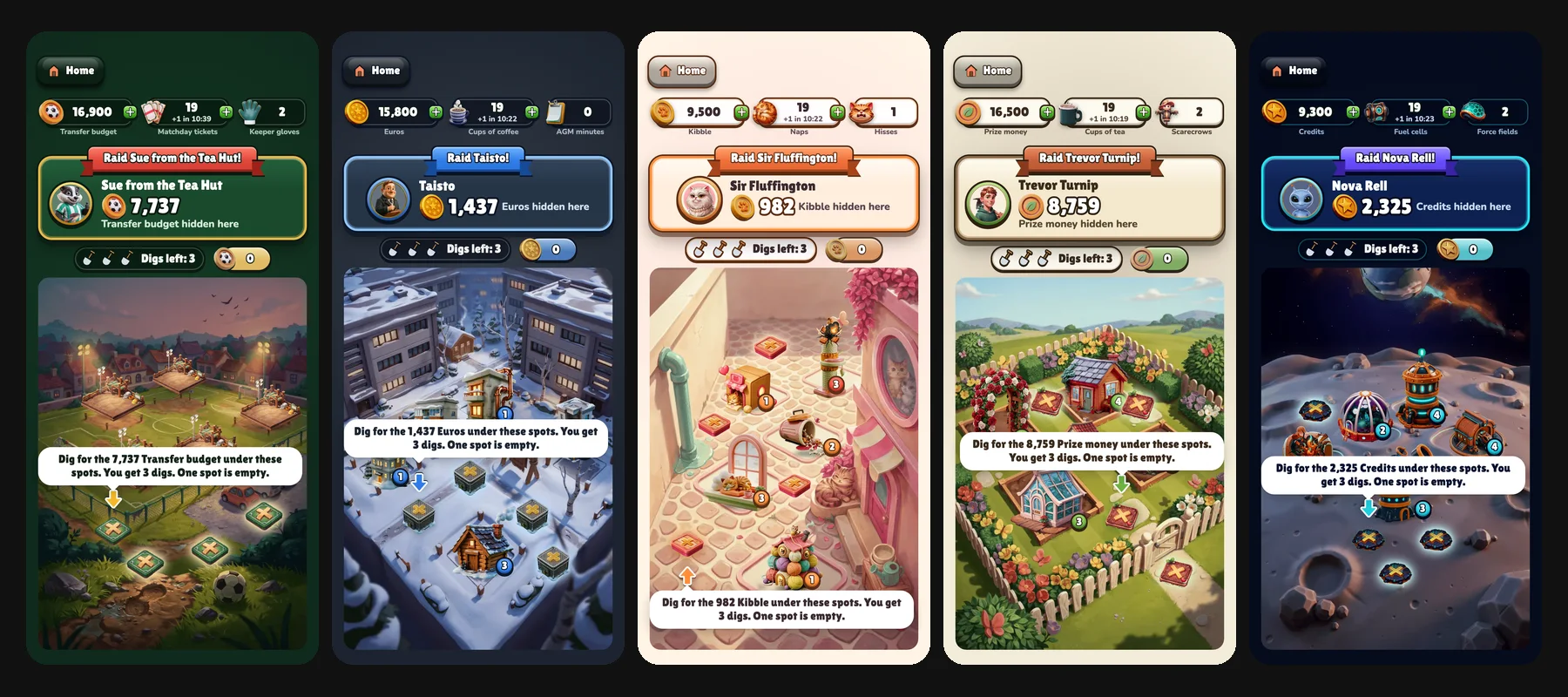
The first surprise was how little it took to make one project behave like five games with Metaplay. That part comes down to game configs and segmentation. The browser sends the theme and the ad's tags when the session starts, and on the player's first session the server writes them on the player once. Every player-facing word, image and colour comes from the game configs, with one column per theme, so the same build shows a different game to each player. Each theme has its own player segment, so events, offers and experiments know which game the player is in from the first screen. The browser also keeps a separate account for each theme, so if you open a second theme you start it from scratch with a new identity, and nothing carries over between games.
Setting up the multiplayer surprised me too. I knew Metaplay was designed for these kinds of games so I expected it to be straightforward, but still, the fact that you could separate one game into five, with five separate player accounts and IDs, was pretty incredible. The social mechanics are what hold a raid game together: you attack and raid other players while they're offline, add friends by code or invite link, and take revenge on whoever hit you last. On Metaplay, the attacker's account sends each attack or raid to the defender's account on the server, so the coins move from one player to the other exactly once, even when the defender isn't online. Each game also has its own pool of opponents. The async matchmaker only pairs players from the same theme, and invite links carry the theme, so you only ever play against people in the same variant. A cat never raids a football club. When the matchmaker finds nobody at a similar level, the server builds a bot, so every raid has a target.
The quality of the art took a lot of people on the team by surprise. I generated it with Higgsfield, like the ad videos, and each theme has its own folder of about 50 images.
So did the sheer breadth of what we covered in such a short time: server-drawn spins and raid loot that the client can't predict, async raids on offline players, a starter offer and an out-of-spins offer, daily events plus one event per theme, an A/B test on starting spins (40 or 64), dashboard cards showing each player's theme, ad source and attack history, and a funnel export for every theme.
How to run your own full-funnel marketing and game test
Here's the process I'd follow to find your best-performing prototype:
Analyse the market. Pick a genre with a proven core loop and real revenue at the top of the charts. I picked raid-and-build because games like Coin Master and Monopoly Go have shown the loop works for years.
Brainstorm themes for different audiences. The point is to find out which audience responds, so each theme should speak to a different group of players: sports fans, cat lovers, gardeners, sci-fi fans and anyone who has lived through a Finnish apartment-block renovation. (Of course, I threw putkiremontti in as a lighthearted joke for an office laugh. If you're launching a real game, you should probably pick something more serious. Or who knows, maybe putkiremontti is actually a top-grossing theme.)
Make one ad per theme. I made one pitch video for the whole idea and one user-made-style ad per theme, with AI presenters in front of mock-up screens of each game.
Install the Metaplay CLI and the Metaplay Agent. This is where the game itself starts. The Metaplay CLI is free and installs with one command (the commands are at the end of this post). Running
metaplay skills installin your project gives your coding agent the Metaplay Agent: the Metaplay docs and the skills it needs to build, run and deploy a Metaplay game. I started from one of our samples rather than an empty folder, so the agent had a working server, browser client and LiveOps Dashboard to build on from the first prompt.Build the core game on a Metaplay game server. Write the game logic once, in C#, and the same code runs in the player's browser and on the server. The server checks every spin, build and purchase, so the economy is cheat-proof from day one, which matters even in a prototype if you want numbers you can trust. The pieces a raid game needs, such as the async matchmaker, LiveOps events, offers, experiments and the LiveOps Dashboard, are part of the Metaplay SDK, so the agent wires them up instead of writing them from scratch. When the game is ready, you deploy it to a Metaplay cloud environment and anyone with the link can play it in a browser.
Put the themes in Metaplay's game configs and keep the rules identical. Every theme shares the same rules, numbers and progression, so the only difference you're measuring is the theme. The rules live in shared config sheets, and every player-facing word, image and colour lives in one sheet with one column per theme. A new theme is a new column and a folder of art, and you can publish a config change to the running server without a new deploy.
Tag each player with the ad they came from. Give each ad its own link with the theme and the ad's tags in it, have the server record them on the player's first session, and create a player segment per theme. From then on, the LiveOps Dashboard can count and target each theme's players separately.
Set up your measurement before you spend anything. Meta Ads Manager gives you impressions, clicks and spend. Everything after the click comes from the game server, which records an analytics event for every spin, build, raid and purchase, each tagged with the theme. A small script reads it once a day through the Metaplay Admin API and writes one table per theme:
Funnel step Where the number comes from Impressions, clicks, click-through rate, spend Meta Ads Manager Accounts created, and cost per account Metaplay, joined with Meta spend First build, and minutes to first build Metaplay First session finished: spin, build, attack and raid Metaplay Day 1, 3 and 7 return, sessions and spins Metaplay Shop opens, purchases and payer share Metaplay Run one campaign with one ad set per theme. Give each ad set its own budget and point each ad at its theme's link. Check the ad platform's rules for your genre first: a slot machine counts as simulated gambling on Meta, which limits the ages and countries you can target.
Pick the winner on the whole funnel. The cheapest click isn't the answer on its own. Look at the cost per player who comes back on day 1, and at what those players do in the game, then take that theme into full production.
Where this goes next
This isn't the final version, and we still need to finish it. We haven't got the full-funnel ad version working yet: running the ads is the next step, and we hope to share more about it in a future article. For now, we wanted to share the groundwork we did to get this sample up and running, and the parts of Metaplay that made it possible. In the meantime you can play all five themes in your browser.
Install the Metaplay CLI and start developing with the Metaplay Agent for free
On macOS, with Homebrew:
brew tap metaplay/homebrew-tap
brew install metaplay
On Windows, with Scoop:
scoop bucket add metaplay https://github.com/metaplay/scoop-bucket
scoop install metaplay
On Linux:
bash <(curl -sSfL https://metaplay.github.io/cli/install.sh)The market validation sample isn't public yet, so start from Table Stakes, the sample I built it on. Paste this into your coding agent from an empty directory:
Clone https://github.com/metaplay-shared/samples, go into Samples/TableStakes, run metaplay skills install there to install the Metaplay Agent, and open a playable version of the game locally in my browser so I can start building on top of it.3 months of Metaplay Starter, free for builders
Use code SHIP-FREE in the Metaplay Portal.
How to claim your discount
1Create a project
2Pick the Starter plan
3Add code at checkout
The code can be used once per customer.
FAQ
How does one Metaplay project serve five themes?
The browser client sends the theme from the ad link in the session start request, and the server writes it on the player in the first session. Game configs hold each theme's text in its own column, and a player segment per theme lets the LiveOps Dashboard count and target each theme's players. See player segments.
Is the theme an A/B test?
No. The ad link decides the theme, so there is no random split and no control group. The sample runs a separate experiment on starting spins across all five themes, and the export splits each theme's numbers by experiment group.
Which in-game KPIs does the sample record?
Accounts, first build, first-session completion, day 1, 3 and 7 return, sessions, spins, attacks, raids, shop opens and purchases, per theme and per ad. A daily script reads them through the Metaplay Admin API, and it can join Meta's spend per ad to give a cost per retained account.
How do I add a sixth theme?
Add a row to the themes sheet, a column to the theme text sheet, a folder of art and one member in the theme text config class. Then publish the new config to the server. See working with game configs.

![Player Expectations in 2025: An Overview of Key Player Trends in Games [Updated for 2026]](/images/blog/player-expectations-in-games-in-2025-featured.webp)
![AI in Game Development: How Studios Are Using AI to Build and Operate Games [Updated for 2026]](/images/blog/ai-in-game-development-featured.webp)